Performance Analysis & Improvements
This page dives into some of details of our changes to provide context for the performance improvements.
Glassbreakers targets 90Hz rendering on Apple Vision Pro, requiring a GPU frame time of approximately 10ms (including system overhead). Using stock UE 5.5, a simple sample scene measured at 14.4ms, well over budget.
Here's an overview of how we reduced this to 4.15ms, a 71% reduction in frame cost, while also reducing frame buffer memory by 65%!
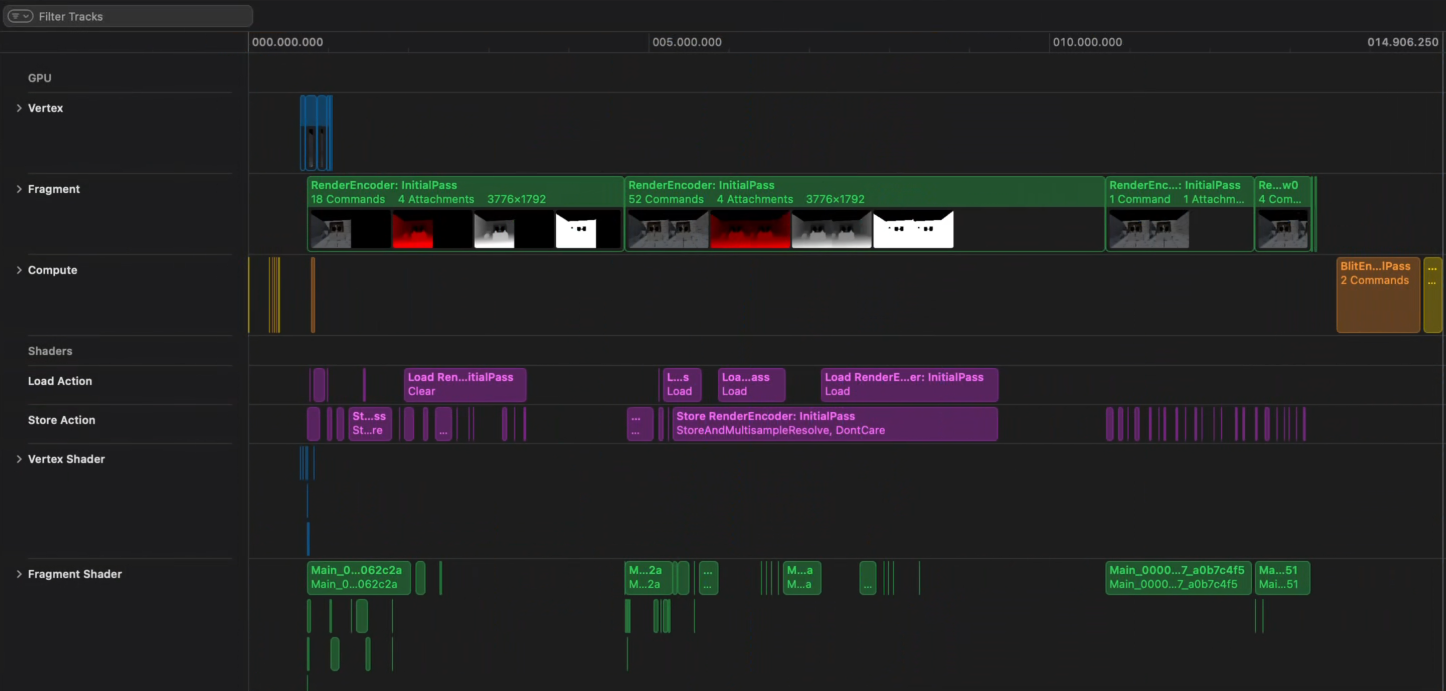
Breaking down this frame time, we found:
- The main viewport (10.7ms) render pass was not optimized for tile-based deferred rendering.
- Inverting alpha for passthrough was performed as a separate pass, taking 2ms, but could be replaced with a significantly cheaper method.
- There were redundant copies from temporary buffers to an intermediate swap chain (0.7ms).
- Finally, the color & depth buffers were copied to the actual swap chain (1ms).
Glossary
Tile-Based Deferred Rendering
Apple Silicon GPUs use a tile-based deferred rendering (TBDR) architecture. This means the frame is divided into smaller tiles, each processed independently on a GPU core. Instead of rendering directly to system memory, which is slow and energy-intensive, each tile is rendered in fast, on-chip tile memory. Once a tile is complete, its results are stored in main memory. If subsequent render encoders need to build on a previous encoder's output, the data must be loaded back from main memory into tile memory.
A render loop not optimized for TBDR can cause major performance losses, and this was the root cause of most initial performance issues we found.
For more details about optimizing for TBDR, see Apple's documentation: Tailor your apps for Apple GPUs and tile-based deferred rendering
Main Viewport Rendering (10.7ms)
Since the majority of the frame time (10.7ms) is spent rendering the main viewport, we'll examine this first.
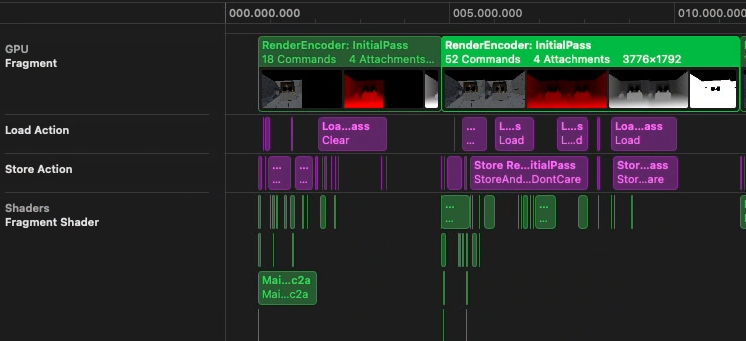
The main issues were:
- Separately rendering each eye
- Very high memory bandwidth load caused by render target/encoder setup
- Unnecessary render target memory usage
Separately Rendered Eyes
The Issue
The stock renderer drawas each eye sequentially using two different encoders to a side-by-side render target.
Because each eye is rendered separately, the CPU must issue separate draw calls for each eye. Rendering both eyes together would halve the number of draw calls, reducing CPU cost.
Rendering both eyes to a single render target is not inherently problematic, but on VisionOS, side-by-side rendering is incompatible with some advanced techniques like foveated rendering. Additionally, since each eye is half of a viewport, post-processing techniques must ensure they do not sample across to the neighboring eye.
Renderin each eye with a separate encoder causes significant memory ovherhad as the framebuffer contents must be copied in and out of tiled memory between the encoders. A single encoder can be used here.
Our goals are threefold: issue draw calls once for both eyes, use only a single encoder to render both eyes, and render to a type of render target compatible with foveation.
The Solution
Unreal on Android already supports these goals using a combination of array render targets and Mobile Multi-View rendering. When using the mobile multi-view code path, a single render encoder is implicitly used.
Mobile multi-view works by issuing a single draw call, which is automatically executed with different parameters for each declared view. Unreal's implementation is based on the Vulkan extension VK_KHR_multiview, but Metal supports a similar feature called Vertex Amplification. When configured correctly, vertex amplification can mimic the behavior of VK_KHR_multiview.
Vertex amplification requires that an amplification_id is added to the Metal shaders generated by Unreal. With our changes to ShaderConductor, any shader set up for multiview will automatically have the correct Metal syntax generated.
High Memory Bandwidth
The Issue
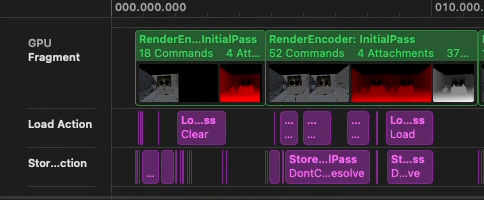
Examining the timeline for the main pass, we see a significant amount of time spent on load and store actions. These represent the frame buffer being copied in and out of tile memory, directly increasing memory bandwidth usage.
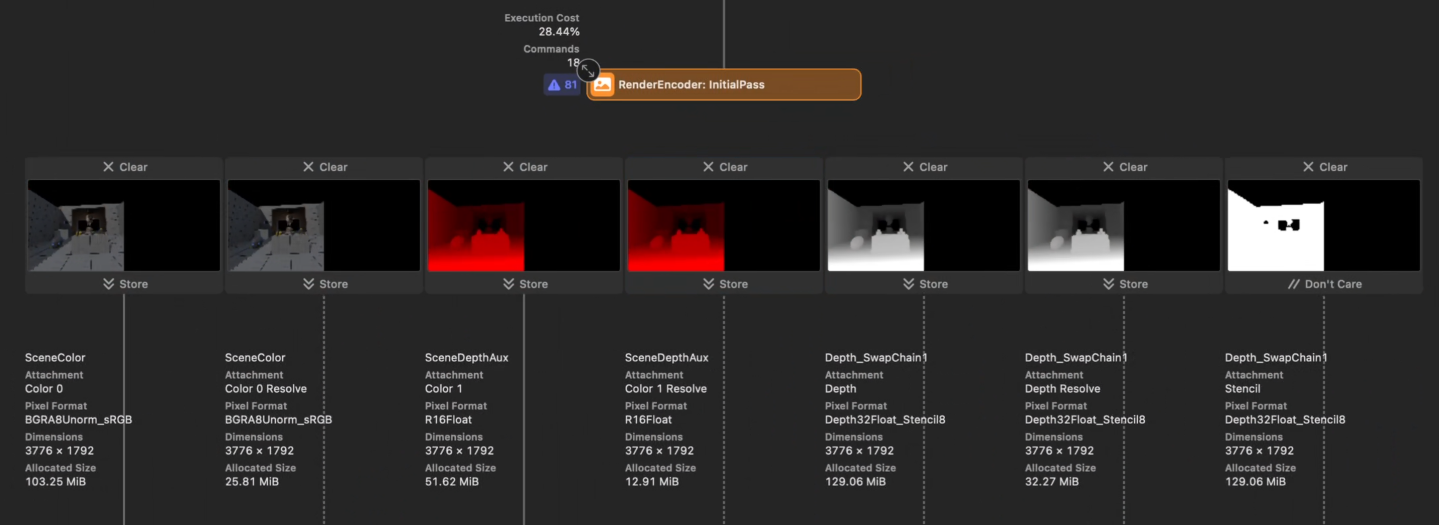
Load and store actions are controlled by the render encoder setup. For the left eye encoder, we found:
- Extra
SceneDepthAuxrender targets were being used unnecessarily. Their result is never consumed. - The multisample render targets were being stored to main memory alongside the resolved target. In a tiled architecture, only the resolved data is needed for future passes, and the MSAA data can be discarded rather than copied.
- Because each eye was rendered with a separate encoder, after the first eye completed, its contents were copied from tile memory to main memory, only to be copied back to tile memory for the second eye encoder. This accounted for several milliseconds of GPU time.
The Solution
Our earlier switch to multi-view rendering already addresses part of this issue. Switching to a single encoder, removed the loads & stores between the multiple encoders.
Removing the SceneDepthAux target was straightforward, as it was only enabled due to legacy iOS compatibility code paths that we could disable.
Finally, since we do not need the MSAA render target data in main memory, we changed the store action on the MSAA targets from Store to Don't Care.
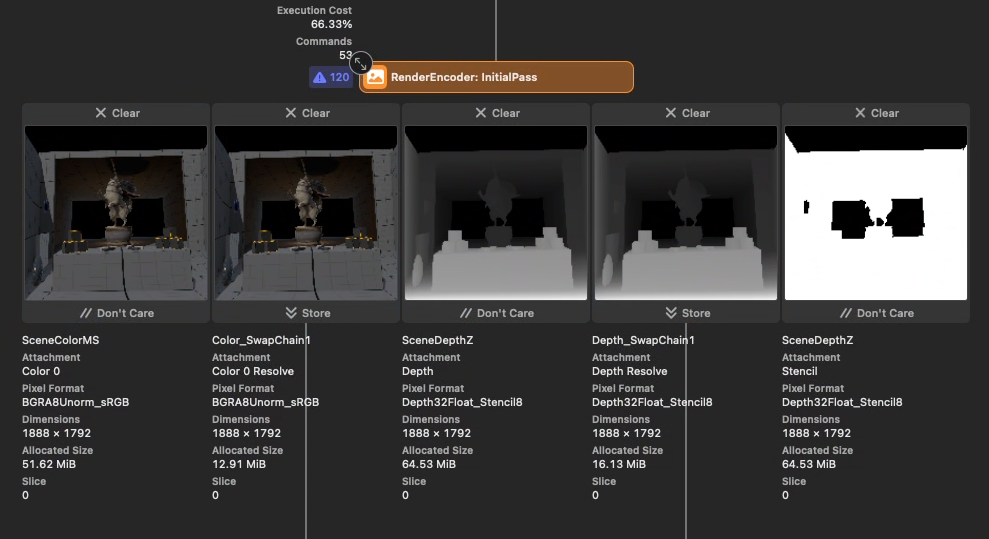
After the changes we can see that only non-msaa targets are getting stored.
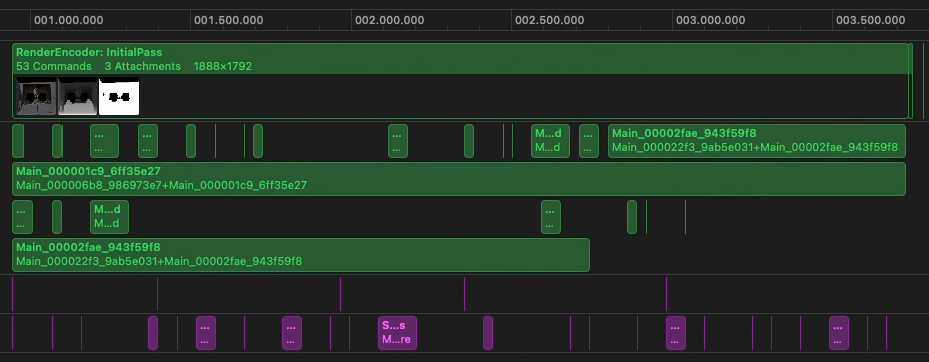
The cost of the main viewport is now only ~2.6ms for both eyes, and is predomainately shader bound, instead of load/store bound.
Unnecessary Render Target Memory
The last issue to address in the main viewport is inefficient render target memory usage.
When we started, total render target memory was 712MB. Removing SceneDepthAux had already saved us 65MB, and a large portion (365MB) of of the remaining render targets consisted of MSAA targets that are now unused.
Metal supports 'memoryless' render targets for targets that only need to exist temporarily in tile memory. Unreal had limited support for memoryless targets, so we expanded this support to near parity with the Vulkan renderer. Since our MSAA targets were switched to Don't Care store actions in the previous section, we could now declare them as memoryless, resulting in a savings of 365MB.
| State | ColorMS | Color | DepthStencilMS | DepthStencil | DepthAux MS | DepthAux | Total |
|---|---|---|---|---|---|---|---|
| Before | 103.25 | 117.57 | 262.12 | 164.4 | 51.62 | 13.12 | 712.08 |
| After | 0 | 92.64 | 0 | 166.55 | 0 | 0 | 259.19 |
In total, render target memory was reduced by 452MB, a savings of 64%!
Inverting Alpha for Passthrough (2ms)
The Issue
Unreal uses an inverted alpha value during frame rendering, but passthrough requires a non-inverted value. To support this, an "Alpha Invert" pass was added. This pass is a separate encoder that loads the existing SceneColor buffer into tile memory, then samples that buffer out of main memory using a shader to write out a color value with an inverted alpha. This process takes about 1.97ms.
The Solution
Instead of using this alpha invert pass, we added a single draw call at the end of main viewport rendering. This draw call is set up to only write alpha, with a blend mode of "Src.A * InverseDestAlpha" + "Dest.A * Zero". By outputting a fixed alpha value of 1 in a shader, we can perform the invert entirely in the blend hardware, eliminating the entire render pass. This updated invert takes only ~0.02ms.
Extra Temporary Buffers & Copies (0.7ms)
The Issue
By default, the scene is resolved to the "SceneColor" buffer, which is a temporary buffer. This buffer then needs to be copied into the Color_SwapChainN buffer.
The Solution
By adjusting some of the logic in scene rendering, we can render directly to Color_SwapChainN rather than a temporary SceneColor buffer, saving 0.7ms.
Copy to Final Output (1ms)
The Issue
Despite their names, Color_SwapChainN and Depth_SwapChainN are not actually the swap chain images, but are regular render targets allocated by the VisionOS OpenXR emulation layer. To populate the actual swap chain images, an additional copy is performed, costing about 1ms.
The Solution
It should be possible to replace Color_SwapChainN and Depth_SwapChainN with the actual swap chain buffers during scene rendering, but we have not yet implemented this optimization. Completing this should save an additional 1ms, and could further reduce render target memory by ~110MB.
Final Result
With all of these optimizations, our final frame time is ~4.25ms and render target memory is 259MB. There are potential future savings of ~1ms still available if we find the need in the future.