
Foveated Rendering
This page dives into our work on foveated rendering. This is one of the most visible improvements to the Unreal Engine VisionOS integration.
Apple Vision Pro has a per-eye panel resolution of (3660x3200), one of the highest in the industry. However, when rendering with Unreal, the app may appear significantly lower in resolution compared to a RealityKit app.
When rendering with Metal, a fixed-size (1888x1792) eye buffer is used, resulting in about 18.4 pixels per degree (ppd). This is lower than the default resolution of many peer devices and less than half the resolution of the panels. This fixed resolution likely keeps the number of rendered pixels reasonable, but results in a noticeably blurry image, especially in high-detail areas such as text.
To improve fidelity while keeping the same number of rendered pixels, VisionOS supports foveated rendering. This technique, common in VR, renders the viewport with non-uniform pixel density—providing more pixels to the focal area and fewer to the periphery.
There are two primary types of foveated rendering (though Metal applications are currently limited to one):
Eye-Tracked Foveated Rendering
Eye-tracked foveated rendering (ETFR), used by RealityKit, leverages eye tracking to dynamically adjust the high-resolution area of the framebuffer based on where your eyes are focused. Because that area that your eye is focused on is known, this technique can be pretty aggressive in pushing pixel density to the focal area, and achieves around ~40ppd at the focal point.
Unfortunately, Metal-based applications are unable to use this method, as it requires access to eye tracking information.
Fixed Foveated Rendering
Fixed foveated rendering (FFR) uses the same core technique of varying pixel density, but does so at a fixed location near the center of the frame. Since your eyes can look away from this region, FFR cannot be as aggressive in reallocating pixel density away from the periphery. FFR's fixed mapping achieves about ~26ppd in the focal area—a significant improvement over not using foveation.
Example: FFR Improvement
| No FFR | FFR |
|---|---|
 |  |
How FFR Works in Metal
When FFR is enabled, the render target provided by the compositor still has a resolution of (1888x1792), but the viewport resolution changes to (4338x3478) (the "physical screen" resolution). A rasterization rate map provided by the system compositor maps a portion of the viewport to a higher pixel density.
In this implementation, the framebuffer is divided into a 58x56 grid of cells, each 32x32 pixels in the framebuffer, but representing a variable density of pixels on the physical screen (ranging from 32x32 up to 400x213 pixels).
For those familiar with the Vulkan concept of a fragment density map, this is similar concept, although there some key technical differences in terms of frame buffer storage and the abiltiy to sample the frame buffer in later passes.
Framebuffer Example
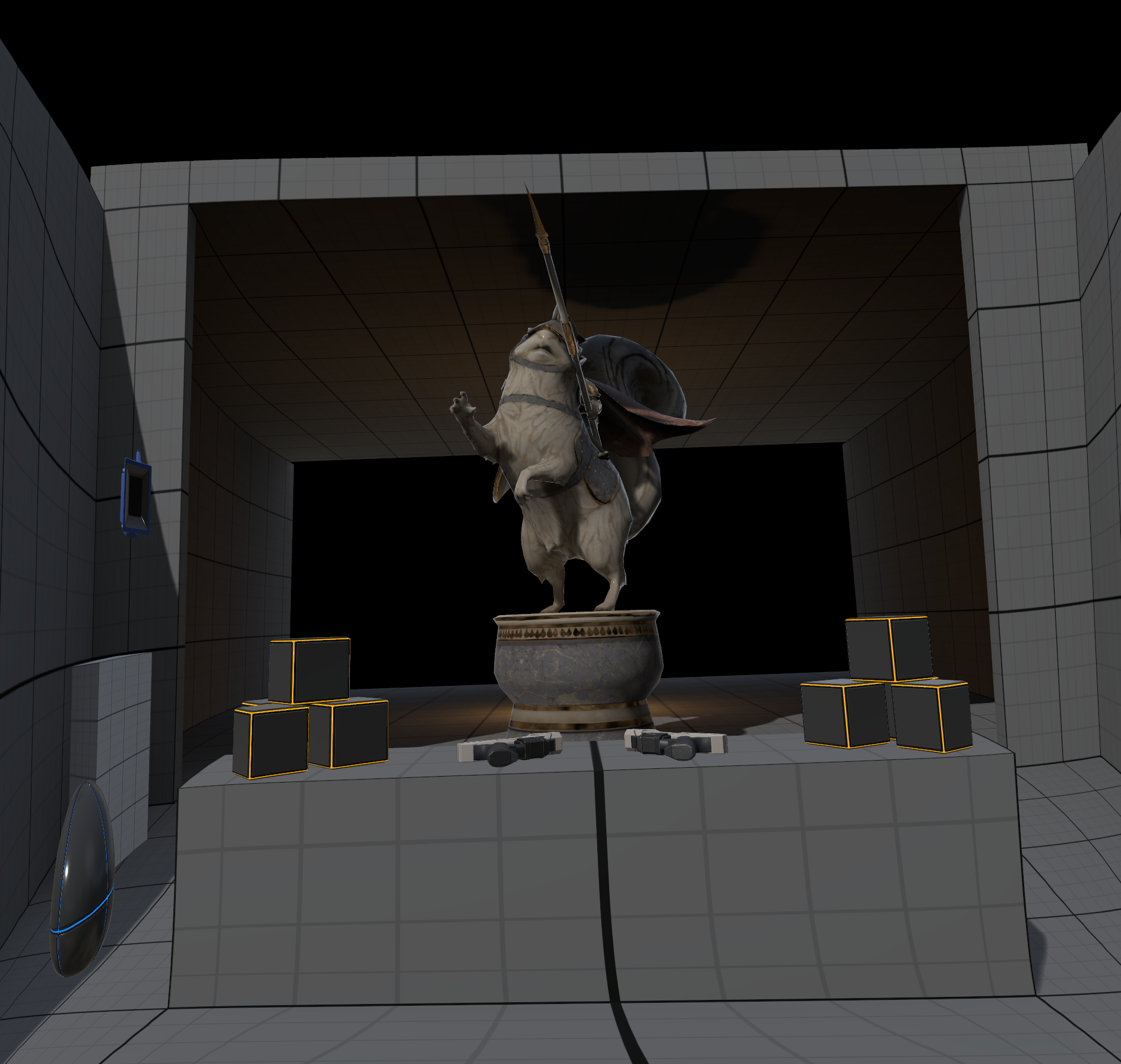 Raw Framebuffer: The image shows how data is stored in the frame buffer. Towards the edges, it appears to be warped, since the fewer pixels are being allocated these regions.
Physical Screen Mapping
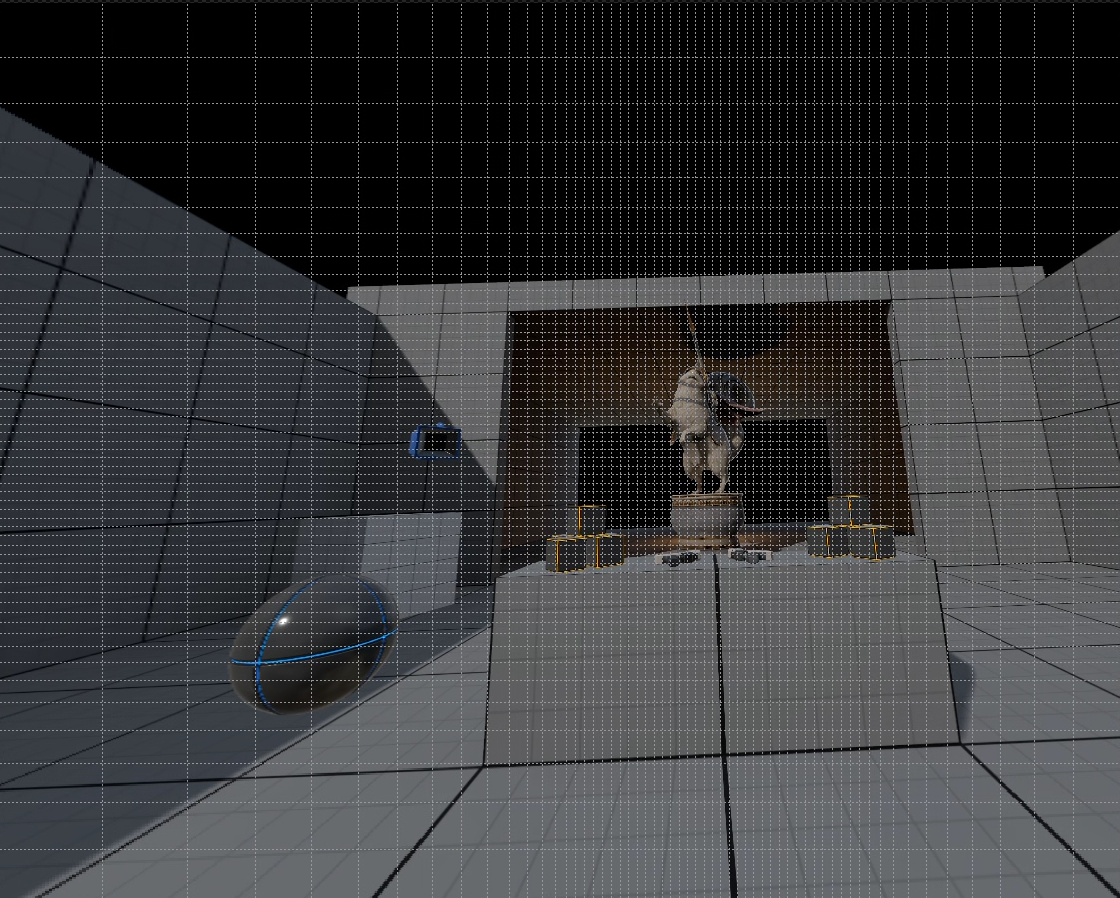 Physical Screen: The overlayed cells show how each 32x32 pixel section of the framebuffer maps back to the physical screen.
Technical Notes
Foveation support is implemented by taking the rasterization rate map provided by the compositor and attaching it to the render pass when rendering.
Term: A rasterization rate map is a data structure (not a texture) that tells the GPU how to vary pixel density across the framebuffer.
Since the rasterization rate map is not a texture, it was not possible to follow the same paths that Vulkan fragment density maps use. Instead, the rasterization rate map is stored as part of the FMetalSurface for the color swap chain. When this surface is bound as a render target, the MetalStateCache automatically binds the rasterization rate map to the render pass.