
Getting Started
This page provides a guide for getting and installing our change to Unreal Engine for VisionOS.
Before you can sync our fork, you must first join the Epic Games GitHub organization. You can find instructions for doing so at https://www.unrealengine.com/en-US/ue-on-github
Once you have access to the main Epic UnrealEngine repo, you should also have access to our fork.
You can find our fork at http://github.com/github-polyarc/UnrealEngineVisionOS
There are two branches in our repo. polyarc-visionos-5.5 is for UE 5.5 and polyarc-visionos-5.6 is for UE 5.6
Cloning our fork
- Unreal 5.5
- Unreal 5.6
git clone http://github.com/github-polyarc/UnrealEngineVisionOS
cd UnrealEngineVisionOS
git clone http://github.com/github-polyarc/UnrealEngineVisionOS
cd UnrealEngineVisionOS
git checkout polyarc-visionos-5.6
Adding fork to an existing local UnrealEngine repository
If you have a previously cloned UnrealEngine repository, you can add our fork as an additional remote.
- Unreal 5.5
- Unreal 5.6
cd <your unrealengine repository path>
git remote add polyarc http://github.com/github-polyarc/UnrealEngineVisionOS
git fetch polyarc
git checkout polyarc-visionos-5.5
cd <your unrealengine repository path>
git remote add polyarc http://github.com/github-polyarc/UnrealEngineVisionOS
git fetch polyarc
git checkout polyarc-visionos-5.6
Sample Application
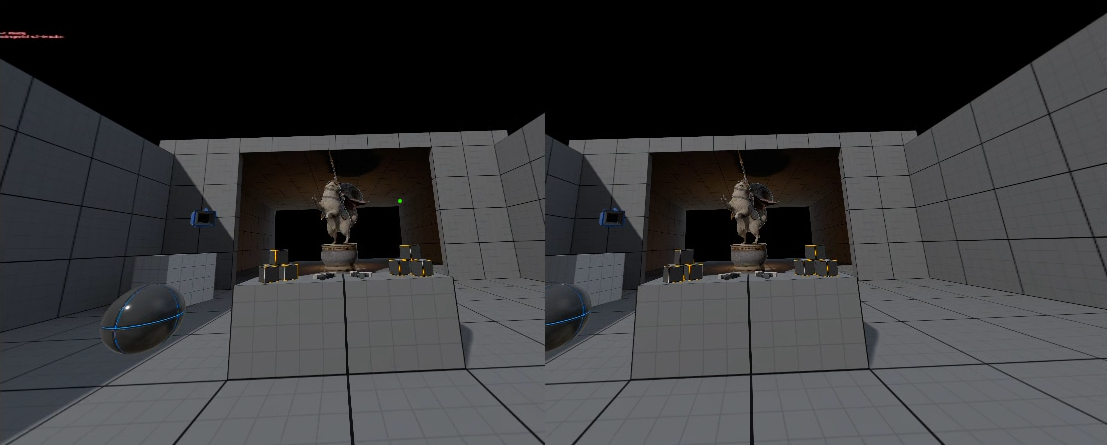
We've included a modified version of the default VR sample that demonstrates most of the features & proper setup for this fork. You can find it in the PolyarcSample folder.
Highlighted here are some of the most important settings that you will need to apply to your project.
[VisionPro DeviceProfile]
; Switch to the standard depth/swap chain mode
+CVars=r.Mobile.XRMSAAMode=0
[/Script/Engine.RendererSettings]
// These settings are currently required for all visionOS projects.
vr.InstancedStereo=False
; Enable mobile multiview rendering.  This is required for performance optimizations, as well as for fixed foveated rendering support.
vr.MobileMultiView=True
xr.OpenXRAcquireMode=1

//Enable these settings for .mixed immersion mode, aka passthrough, AR.
; When using passthrough, propagate alpha values through rendering
r.Mobile.PropagateAlpha=1
r.PostProcessing.PropagateAlpha=1
; Disable the alpha invert pass, since the inline alpha invert will be used when r.Mobile.PropagateAlpha=1
r.AlphaInvertPass=0
; Enable resolving using render passes.  This removes unnecessary copies, as the MSAA resolve hardware can hande this for "free"
rhi.Metal.ResolveUsingRenderPass=True
; In order to support app suspension, the openxr session will be created and torn down multiple times.  Do not exit the app when tearing down openxr session
xr.OpenXRExitAppOnRuntimeDrivenSessionExit=0

[/Script/VisionOSRuntimeSettings.VisionOSRuntimeSettings]
// Immersive style (0 = Full Immersive, 1 = Mixed Immersive)
ImmersiveStyle=1
// Upper limb visibility (0 = Hidden, 1 = Visible, 2 = Automatic)
UpperLimbVisibility=2
; Disable automatic generation of UIApplicationSceneManifest, as it interferes with custom values added to plist
bDisableUIApplicationSceneManifestGeneration=true
; Enable foveation, which improves visual fidelity.  Requires multiview rendering.
EnableFoveation=True
[/Script/Engine.RendererSettings]
; For VisionOS, these must be enabled in both IOSEngine.ini & VisionOSEngine.ini because as of UE 5.5.3 at
; cook time, FShaderPlatformCachedIniValue maps EShaderPlatform::SP_METAL to iOS rather than VisionOS
vr.MobileMultiView=True
[/Script/IOSRuntimeSettings.IOSRuntimeSettings]
MetalLanguageVersion=9
MinimumiOSVersion=IOS_17
; Configure launching directly into an immersive space with mixed reality rendering
AdditionalPlistData=<key>NSHandsTrackingUsageDescription</key><string>Track your hands to interact with the application.</string><key>UIApplicationSceneManifest</key><dict><key>UIApplicationPreferredDefaultSceneSessionRole</key><string>CPSceneSessionRoleImmersiveSpaceApplication</string><key>UIApplicationSupportsMultipleScenes</key><true/><key>UISceneConfigurations</key><dict><key>CPSceneSessionRoleImmersiveSpaceApplication</key><array><dict><key>UISceneInitialImmersionStyle</key><string>UIImmersionStyleMixed</string></dict></array></dict></dict>
Notes
Shader platform
Unreal does not currently define a unique shader platform for VisionOS. When mapping SP_METAL to a platform, it will select iOS instead of VisionOS.
Because of this, any ini value that modifies shader compilation must be specified in both IOSEngine.ini & VisionOSEngine.ini. An example value that needs to be specified in both locations would be vr.MobileMultiView
Compiling ShaderConductor for Mac
Adding support for Mobile MultiView required modifications to to ShaderConductor. Binaries have been been built and included for Mac. If you need updated ShaderCondutor binaries for other platforms, you will need to build yourself.
ShaderConductor binaries have stored in GitLFS rather than UnrealDependencies. See http://github.com/github-polyarc/UnrealEngineVisionOS/commit/25235f5f566614c03d4b9775a4b3f4423c38f4e2 for details.
To build your own binaries for ShaderConductor for Mac, you can run the following.
cd Engine/Source/ThirdParty/ShaderConductor
./Build_ShaderConductor_Mac.command